What you're seeing and hearing in this video is a cover of Bad Apple played on an oscilloscope. If you're not familiar with oscilloscope music, it means that the actual sound waves you're hearing are also directly drawing the curve you see, like on a graphing calculator. I think it's pretty neat, neat enough to write a whole blog post about.
My oscilloscope covers started with Audio Secret Santa 2025 (ASS2025), where I was asked to make oscilloscope music. Around that time, I was just getting into Umamusume, so naturally I made a cover of its greatest theme song, Umapyoi Densetsu. Watch it here:
When I first showed off the Umapyoi cover, some fellow ASS2025 participants asked me to write about how it was made. Although I was pretty proud of the result at the time, I also saw many ways it could be improved. This led me to table the project until ten months later, when I finally had a chance to apply those improvements to Bad Apple.
This blog post explains the key ideas behind both oscilloscope covers and is split into three parts:
- The Main Idea: how to map any sound to any path.
- Forming the Waveform: how to build a sound that still sounds good after mapping onto a path.
- Tracing the Path: how I turned each video frame into a path.
The Main Idea
An oscilloscope is a direct visualization of how the left and right audio channels relate to each other. It's literally a time-varying scatter plot. If the two channels are exactly the same, you see a single straight diagonal line. The left channel determines the X position, and the right channel determines the Y position. In general, oscilloscope music aims to manipulate the sound waveform so that the resulting "scatter plot" looks cool.
Most existing oscilloscope music, by the likes of Jerobeam Fenderson and DJ Level 3, tends to focus on drawing cool geometric shapes using mostly monophonic or otherwise very constrained compositions. As someone who likes anime girls, which are generally not geometric shapes, this bothered me a lot. Surely, there must be some way to draw an arbitrary image of an anime girl on an oscilloscope, right?
As it turns out, drawing an arbitrary path on an oscilloscope is really easy. Osci-Render is an existing piece of software that does exactly this. It works by tracing any given path over and over, and your brain hears the rate at which it repeats the path as a pitch. This way, you can easily play any single note corresponding to any image on an oscilloscope! Problem solved?
The biggest issue with this idea is that it can only generate one pitch at a time. Polyphony, or multiple pitches at a time, doesn't work, because each trip around the path is one cycle of the note. To play two notes, the oscilloscope beam would need to circle the path at two speeds at once, but it can only be in one place. Simply adding two traced sounds together doesn't work, since it just draws a mangled blend of the two images. Feeding a regular polyphonic sound into the tracing sounds really bad, so that doesn't work. As someone who likes to compose music with more than one note at a time, this was troubling, especially if I was going to make a cover of a song that is definitely polyphonic. Surely, there must be a way to do this polyphonically? As it turns out, this is much more difficult.
After pondering the problem for some time, I thought, "Wait, isn't this process of tracing an arbitrary shape exactly the same as feeding a sawtooth into extreme waveshaper distortion?" If so, then it will have all of the same properties as waveshaper distortion. My years of sound design experience taught me that polyphonic sounds sound HORRIBLE when distorted most of the time. But if the notes' frequencies are in simple enough ratios to each other, they can still sound good and, with careful tuning, retain a polyphonic enough character.
After some trial and error, the solution I settled on was pretty simple. First, I create a very fancy sawtooth source track, where I carefully manipulate its phase to create the illusion of multiple pitches, while still keeping the waveform in the fundamental sawtooth shape. Then, I feed this fancy sawtooth into the tracing process. Even if this severely distorts the sound, the pitches should remain intact as long as I do the first part correctly.
Forming the Waveform
As I discussed earlier, I treat the tracing process as a waveshaper that bends the source wave into the shape of the path. While this severely affects the timbre of the sound, it keeps every repetition. If the source repeats 220 times a second, the distorted signal will too, and you will still hear an A at 220 Hz. Therefore, my goal is to build a source that is still made of clean sawtooth ramps, but whose repetitions can be interpreted by the brain as more than one note.
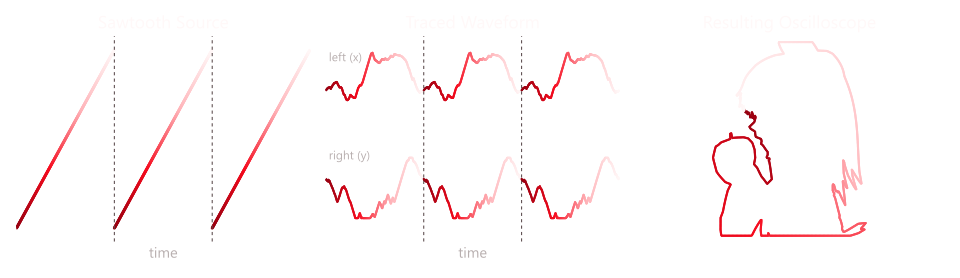
I determined that, to be effective, the source "sawtooth" must have two properties. First, it must sweep the whole range from -1 to 1 evenly, so that the entire image path gets covered evenly. Second, the notes must come from smaller repeating patterns within the waveform, arranged in a simple, steady way. If the patterns aren't simple enough, the pitch won't survive the waveshaper.
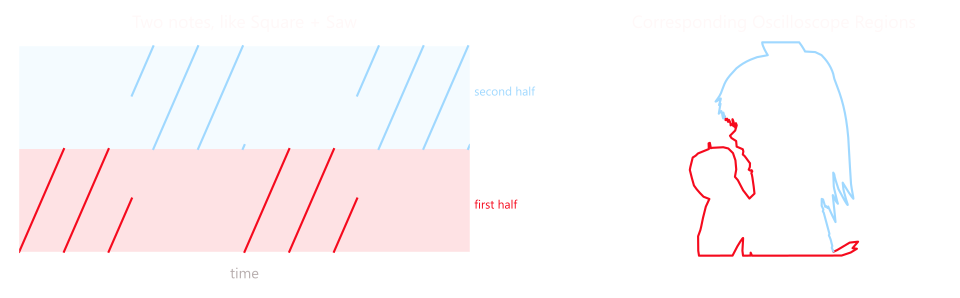
My solution for two-note polyphony is to create a square + saw combination. To explain it, first think of the saw's range as having two halves: -1 to 0 and 0 to 1. The halves switch at the frequency of the lower note, resembling a square wave, while the sawtooth cycles at the frequency of the upper note. The upper note's sawtooth only sweeps across the current half. If I reset the phase of the upper note every time the lower note starts a new cycle, this creates a sound that has both properties mentioned above and should thus survive waveshaper distortion very well.
The two-note solution generalizes relatively well to three notes. The lowest note still flips between the two halves, but now each half takes on a different upper note. The ear still hears all three notes, but with a little roughness from the switching between the two upper notes, similar to a fast chiptune arp. Fortunately, as the very widespread use of fast chiptune arps shows, this doesn't sound too bad at all.
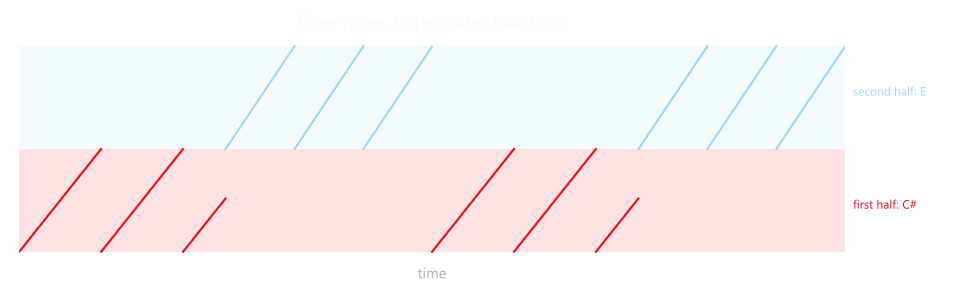
While it is possible to generalize the three-note solution further, the more upper notes you try to fit into the period of a lower note, the harder it is to actually hear them. Fortunately, the main harmonic content of Bad Apple can be expressed with three-note polyphony, so that's enough. Now that the first half of the problem is figured out, let's talk about the other half.
Tracing the Path
The process of turning a video's frames into a traceable waveshaper curve is relatively straightforward. First, I turn each frame into a pure black-and-white image by thresholding on brightness. Then, I use potrace to trace the outlines of the black areas into a vector curve path in SVG format. Finally, I sample the curves to create a long list of X and Y points, which become the waveshaper curves for the left and right audio channels, respectively.
The biggest limitation to this whole thing is that there isn't much information available to depict each image. Even at the highest audio sample rate my computer supports, 192 kHz, each frame only gets 6,400 samples. An A3 note at 220 Hz gets only about 870 points per trip around the path, which is not that much, especially for frames with many edges, curves, or particles.
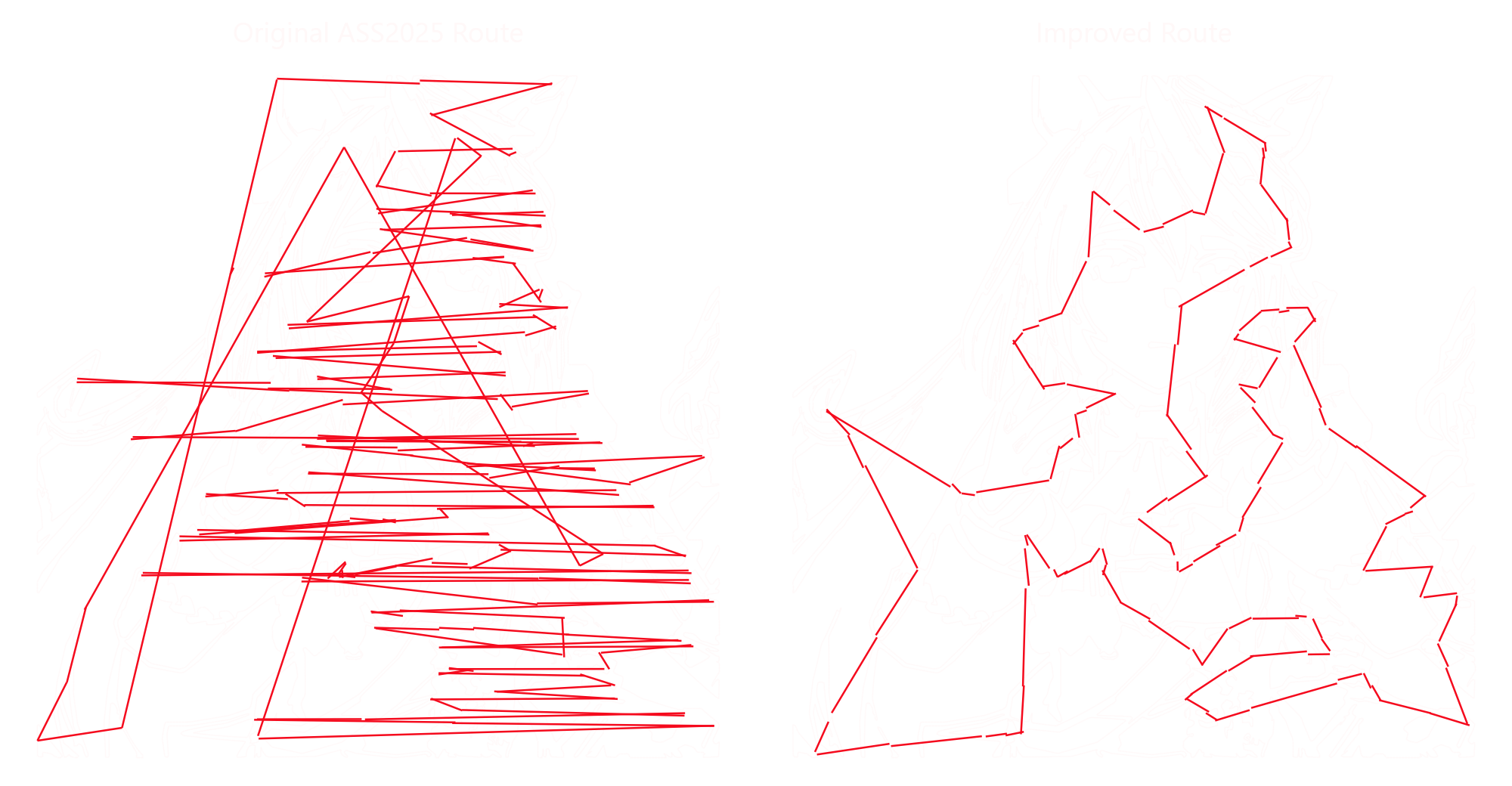
My first attempt following this procedure on Umapyoi Densetsu made it very clear I needed to solve three additional issues. First, using potrace naively meant the many components of the path were visited in whatever order potrace listed them, leading to many random jumps across the screen. Second, I had sampled target points by splitting each curve segment into a fixed number of pieces and targeting each segment piece. This meant the targeted points were not evenly spaced in real distance, which led to very uneven brightness across the shape in the final oscilloscope render. Third, each frame's curve started at a basically random position, meaning transitions between frames were not smooth, leading to noise in the resulting sound.
Fixing the first problem meant carefully choosing the order in which to visit the curve segments and where to enter each one. This turns out to be the well-known travelling salesman problem (TSP). I didn't want to run a full TSP solver for every frame, so I built a quick solver that greedily jumps to the nearest unvisited outline, then improves the route by reversing stretches whenever that makes it shorter. This ended up doing well enough. Fixing the second problem was simpler. I measured the total length of the path and placed the points at equal distances along it, so every part of the picture got the same share of points. Fixing the third problem was also pretty straightforward. I just needed my code to plan each new frame's route starting from the previous frame's, then pick the starting point and direction that lined the new path up with the old one as closely as possible. These improvements are shown on an Umapyoi frame below. I later used these improvements to make Bad Apple.
End
I hope you enjoyed reading about how I made these oscilloscope covers. I don't plan on making more, as I personally think it doesn't get much better than Bad Apple. Its simple silhouettes and melody are very well suited to information-limited covers like this, and it's a song people already cover in weird and fun ways. But who knows? Maybe a reader can prove me wrong.